
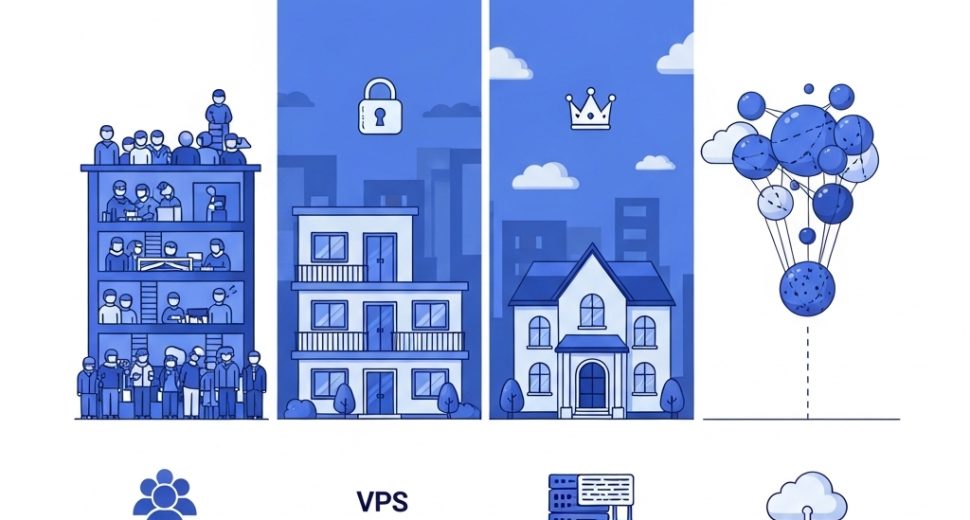

Picking a web hosting plan sounds simple — until you realize there are four completely different types of hosting, each built for different needs, budgets, and technical skill levels.
Choose the wrong one and you’ll either overpay for resources you don’t need, or find your website crawling to a halt because your plan can’t handle your traffic.
This guide breaks down every major type of web hosting in plain, honest language — what each one is, how it works, who it’s for, and what it actually costs. By the end, you’ll know exactly which type fits your website right now, and what to upgrade to as you grow.
Why the Type of Web Hosting You Choose Actually Matters
Before we dive in, let’s establish something important: not all web hosting is the same.
The type of hosting you choose directly affects:
- Speed — how fast your pages load for visitors
- Uptime — how often your site stays live vs. goes down
- Security — how well your data and files are protected
- Scalability — how easily you can grow without migrating everything
- Cost — how much you spend monthly or annually
Most beginners pick the cheapest plan without understanding what they’re actually getting. This guide fixes that. Let’s go through every major type of web hosting, one by one.
The 4 Main Types of Web Hosting
Here’s a quick-reference overview before we go deep:
| Hosting Type | Best For | Starting Cost | Technical Skill Needed |
|---|---|---|---|
| Shared Hosting | Beginners, small sites | $2–$10/mo | Low |
| VPS Hosting | Growing businesses | $10–$60/mo | Medium |
| Dedicated Hosting | Large, high-traffic sites | $80–$300+/mo | High |
| Cloud Hosting | Scalable, flexible needs | Pay-as-you-go | Low–Medium |
Now let’s explore each one in depth.
1. Shared Hosting — The Beginner’s Starting Point
What is Shared Hosting?
Shared hosting is exactly what it sounds like: your website shares a single physical server with hundreds or even thousands of other websites. All of these sites draw from the same pool of resources — CPU, RAM, storage, and bandwidth.
Think of it like renting a seat in a co-working space. You’re in the same building as everyone else, sharing the Wi-Fi, the printers, and the coffee machine. It works just fine — until the office gets overcrowded.
How Shared Hosting Works
The hosting provider installs software (like cPanel or Plesk) that partitions the server and allocates resources across all accounts. Each user gets their own section to manage their files, databases, and email — but the underlying hardware is shared.
Who Should Use Shared Hosting?
Shared hosting is the right choice if you are:
- Building your first website or blog
- Running a small business brochure site with low traffic
- Working with a tight budget
- Not expecting more than a few thousand visitors per month
Pros of Shared Hosting
- Cheapest option available — often under $5/month
- Beginner-friendly — no server management required
- Comes preconfigured — ready to use out of the box
- Includes basic tools — email, file manager, one-click installs
Cons of Shared Hosting
- “Bad neighbor” effect — if another site on your server gets a traffic spike, your site slows down
- Limited resources — storage, RAM, and CPU are capped and shared
- Less control — you can’t configure the server environment
- Not ideal for high traffic — will struggle under serious load
Shared Hosting Cost
Expect to pay between $2 and $10 per month, though introductory prices are often much lower. Always check the renewal rate — many providers drop the price to hook you, then raise it significantly on renewal.
Shared Hosting Verdict
✅ Perfect for: Beginners, blogs, small business sites, portfolios
❌ Not ideal for: Growing e-commerce stores, high-traffic platforms, resource-heavy applications
2. VPS Hosting — The Smart Upgrade for Growing Websites
What is VPS Hosting?
VPS stands for Virtual Private Server. It’s one of the most popular types of web hosting for businesses that have outgrown shared hosting but don’t yet need a full dedicated server.
A VPS uses virtualization technology to divide one powerful physical server into multiple isolated virtual machines. Each virtual machine — or VPS — acts like its own independent server, with its own dedicated CPU, RAM, and storage.
The apartment building analogy works perfectly here: you’re still in the same building as others, but your apartment is completely yours. What your neighbors do doesn’t affect your unit.
How VPS Hosting Works
The hosting provider runs a hypervisor (virtualization software) on a physical server. This software creates several isolated virtual environments, each with guaranteed resources that aren’t shared with other VPS users on the same machine.
You get root access to your virtual server, meaning you can install custom software, configure settings, and manage your environment exactly as you need.
Who Should Use VPS Hosting?
VPS hosting is the right choice if you are:
- Running an e-commerce store that handles transactions
- Getting consistent traffic of tens of thousands of visitors monthly
- Building web applications or custom environments
- Needing more control over your server configuration
- Scaling up from shared hosting due to performance issues
Pros of VPS Hosting
- Dedicated resources — guaranteed CPU, RAM, and storage
- Better performance — no bad neighbor effect
- Root access — full control over the server environment
- Scalable — easily upgrade resources as you grow
- More secure — isolated environment means better protection
Cons of VPS Hosting
- More expensive than shared hosting
- Requires some technical knowledge — especially on unmanaged plans
- You’re responsible for server maintenance on unmanaged VPS
Managed vs. Unmanaged VPS
This is a critical distinction when shopping for VPS hosting:
- Managed VPS — the hosting provider handles server updates, security patches, and monitoring. You focus on your website.
- Unmanaged VPS — you get full control but are responsible for everything: setup, software installation, security, updates. Best for developers.
If you’re not technical, always choose a managed VPS plan.
VPS Hosting Cost
VPS hosting typically runs between $10 and $60 per month, depending on the resources allocated and whether the plan is managed or unmanaged.
>VPS Hosting Verdict
✅ Perfect for: Growing businesses, online stores, developers, high-traffic blogs
❌ Not ideal for: Complete beginners with no technical support, very low-traffic sites that don’t need the extra power
3. Dedicated Hosting — Maximum Power, Total Control
What is Dedicated Hosting?
With dedicated hosting, you rent an entire physical server — just for yourself. No other websites. No shared resources. No neighbors. Every byte of CPU, every gigabyte of RAM, every thread of bandwidth belongs exclusively to your website or application.
This is the most powerful and most expensive of all the types of web hosting, designed for large-scale operations that demand peak performance.
How Dedicated Hosting Works
The hosting provider maintains the physical server hardware in their data center and gives you complete access to manage it. You have full control over the operating system, software stack, security configuration, and everything else.
Some providers offer managed dedicated servers, where their team handles maintenance, while unmanaged dedicated servers put all responsibility on you or your technical team.
Who Should Use Dedicated Hosting?
Dedicated hosting is the right choice if you are:
- Running a high-traffic website with millions of monthly visitors
- Operating a large e-commerce platform that processes heavy transactions
- Hosting multiple websites and applications on one powerful machine
- Working in an industry with strict data compliance requirements (healthcare, finance, legal)
- Running resource-intensive applications like game servers or streaming platforms
Pros of Dedicated Hosting
- Unmatched performance — full server resources, nothing shared
- Complete control — configure everything exactly as needed
- Enhanced security — isolated environment, no third-party risk
- Reliable uptime — no other sites competing for your resources
- Custom hardware options — choose your RAM, CPU, storage specs
Cons of Dedicated Hosting
- Expensive — significantly higher cost than shared or VPS
- Requires advanced technical knowledge — especially unmanaged
- Overkill for small sites — most businesses simply don’t need this level of power
- Longer setup time — not as instant as shared or VPS plans
>Dedicated Hosting Cost
>Dedicated hosting starts at around $80/month and can go well beyond $300/month for high-spec, fully managed configurations.
Dedicated Hosting Verdict
✅ Perfect for: Large enterprises, high-traffic platforms, data-sensitive businesses, developers needing full server control
❌ Not ideal for: Small businesses, beginners, anyone on a limited budget
4. Cloud Hosting — The Flexible, Modern Alternative
What is Cloud Hosting?
Cloud hosting is the newest and most innovative of the major types of web hosting. Instead of relying on a single physical server, cloud hosting distributes your website across a network of interconnected servers — the “cloud.”
If one server in the network experiences problems, another server instantly takes over. Your website keeps running seamlessly.
This makes cloud hosting incredibly resilient and almost infinitely scalable — you can increase or decrease your resources in real time, often with just a few clicks.
How Cloud Hosting Works
Your website’s data is replicated across multiple servers in different locations. A load balancer directs incoming traffic to whichever server is best positioned to handle it — reducing latency and preventing overloads.
You’re billed based on the resources you actually consume — storage, bandwidth, processing power — rather than a fixed monthly plan. This is often called a pay-as-you-go model.
Who Should Use Cloud Hosting?
Cloud hosting is the right choice if you are:
- Running a business with unpredictable or seasonal traffic spikes
- Building a SaaS product or web application that needs to scale fast
- Operating in multiple regions and need low-latency global delivery
- Wanting high availability without paying for dedicated hardware
- Looking for a flexible billing model where you only pay for what you use
Pros of Cloud Hosting
- Exceptional uptime — redundancy across multiple servers
- Instantly scalable — scale up or down in real time
- Pay-as-you-go pricing — great for variable traffic
- Global infrastructure — servers in multiple regions reduce load time
- No single point of failure — one server going down doesn’t affect your site
Cons of Cloud Hosting
- Unpredictable costs — usage-based billing can surprise you during traffic spikes
- More complex to configure — especially for beginners
- Vendor lock-in risk — migrating away from some cloud platforms can be tricky
- Overkill for simple sites — small websites rarely need this level of infrastructure
Cloud Hosting Cost
Cloud hosting is harder to pin down because pricing is consumption-based. Small setups can run as low as $5–$20/month, while large-scale applications can cost hundreds to thousands per month depending on usage.
Cloud Hosting Verdict
✅ Perfect for: SaaS businesses, apps with variable traffic, global platforms, businesses needing high availability ❌ Not ideal for: Beginners who want predictable pricing, simple sites that don’t need scaling
Bonus: Other Hosting Types Worth Knowing
Beyond the four main categories, you’ll encounter a few other types of web hosting worth understanding:
WordPress Hosting
A specialized version of shared or cloud hosting, optimized specifically for WordPress websites. The server environment is pre-configured for WordPress performance, with auto-updates, caching, and staging environments built in.
Best for: WordPress users who want hands-off, optimized performance.
Reseller Hosting
Allows you to purchase hosting resources in bulk and sell them to your own clients under your own brand. Popular with web designers and agencies.
Best for: Freelancers and agencies managing multiple client sites.
Email Hosting
A dedicated service just for business email (you@yourdomain.com) — separate from website hosting. Offers better deliverability, spam protection, and mailbox management than bundled email.
Best for: Businesses that want reliable, professional email independent of their web hosting.
How to Choose the Right Type of Web Hosting
Still not sure which one’s right for you? Use this simple decision framework:
Start with these questions:
- How much traffic do you expect?
- Under 10,000 visits/month → Shared Hosting
- 10,000–100,000 visits/month → VPS Hosting
- 100,000+ visits/month → Dedicated or Cloud Hosting
- Do you have technical knowledge or a developer on hand?
- No → Shared or Managed VPS or Cloud
- Yes → Unmanaged VPS or Dedicated
- Is your traffic steady or unpredictable?
- Steady → Shared, VPS, or Dedicated
- Spiky/seasonal → Cloud Hosting
- What’s your budget?
- Minimal → Shared Hosting
- Moderate → VPS Hosting
- Flexible → Cloud or Dedicated
Quick Comparison: All Types of Web Hosting Side by Side
| Feature | Shared | VPS | Dedicated | Cloud |
|---|---|---|---|---|
| Price | Lowest | Medium | Highest | Variable |
| Performance | Basic | Good | Excellent | Excellent |
| Scalability | Low | Medium | Low | High |
| Control | Low | High | Full | Medium–High |
| Uptime Reliability | Good | Very Good | Excellent | Best |
| Technical Skill | None | Medium | High | Low–Medium |
| Best For | Beginners | Growing sites | Enterprises | Scalable apps |
Frequently Asked Questions About Types of Web Hosting
Which type of web hosting is best for beginners?
Shared hosting is the easiest and most affordable starting point for beginners. It requires no technical knowledge and works perfectly for new websites and small business sites.
When should I upgrade from shared to VPS hosting?
If your site is consistently slow, experiencing downtime during traffic peaks, or you’re running an online store — it’s time to move to VPS hosting.
Is cloud hosting the same as VPS hosting?
No. VPS hosting typically runs on a single physical server divided into virtual machines. Cloud hosting distributes your website across multiple servers in a network, offering better redundancy and scalability.
Can I switch between hosting types later?
Yes, absolutely. Most hosting providers allow you to upgrade your plan. Migrating between completely different providers takes more effort, but many hosts offer free migration assistance.
What type of hosting do most small businesses use?
Most small businesses start on shared hosting and upgrade to VPS hosting as their traffic and requirements grow.
Final Thoughts: Matching the Right Hosting Type to Your Needs
There’s no single “best” type of web hosting — there’s only the best fit for your specific situation.
- Just starting out? Shared hosting has you covered.
- Growing fast and needing more power? VPS hosting is your next step.
- Running a major platform with serious traffic? Dedicated hosting gives you total control.
- Need flexibility and resilience at scale? Cloud hosting is built for you.
The smartest move is to start where you are, choose a provider that makes upgrading easy, and scale as your needs evolve. Your hosting should grow with your business — not hold it back.